
Intro:
IC777 users may need help with a few common tasks after creating an account or installing the app. This IC777 how-to guide covers the basic steps for accessing an account and handling other everyday actions in a simple format. If you have not installed the app yet, follow our IC777 Game Download guide first.
Table of Contents
IC777 How To Guides
How to Login to IC777
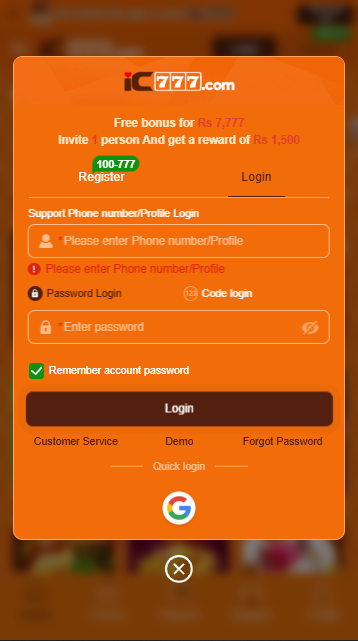
If you already have an IC777f account, you can access it through the login section using your registered account details. Make sure the information you enter matches the details associated with your account. New users can also read our IC777 Game Registration guide before creating an account.
Login Steps
- Open IC777 — Launch the IC777 game app or open the website on your Android device.
- Find the Login option — Select the Login button from the available account options.
- Enter your account details — Provide your registered mobile number, username, or other information requested by the login form.
- Enter your password — Type your account password carefully and check for any typing mistakes.
- Complete verification — If the platform displays an OTP or another security check, complete the requested verification.
- Access your account — After checking your information, press Login to continue to your account.
Security Tip: Keep your password, OTP, PIN, and other private account information confidential. If you cannot log in, check your details first instead of giving your credentials to someone else.
How to Update the IC777 App
Keeping the app updated can help you avoid issues that may appear when an older version no longer works properly with the current platform. Before replacing your existing installation, make sure you know your login details and have enough free space on your Android phone.
Steps to Update IC777
- Check for a newer version — Open the source you normally use for the IC777 APK and check whether a newer release is available.
- Review the APK details — Check the version information and make sure the file is intended for Android devices.
- Download the latest APK — Start the download and allow it to finish completely before opening the file.
- Open the downloaded file — Go to your Downloads folder and select the newly downloaded APK.
- Start the update — Follow the installation screen shown by Android. If the existing version can be updated, Android will normally install the newer files over it.
- Wait for completion — Do not interrupt the installation while the update is being applied.
- Open IC777 — Once the process finishes, launch the app and check that your account and main features are working normally.
Tip: Avoid installing modified or unfamiliar APK files just because they claim to provide extra features. Check the source and version before replacing the application on your phone.
How to Deposit with JazzCash
For users in Pakistan, JazzCash can be a convenient payment method when it is listed as an available option inside IC777. The exact payment procedure can depend on the current platform instructions, so check the details shown in your account before sending any money.
Steps to Deposit Using JazzCash
- Log in to IC777 — Open your account and make sure you are on the correct profile.
- Open the Deposit section — Find the payment or deposit area from your account menu.
- Choose JazzCash — Select JazzCash if it is currently available among the listed payment methods.
- Check the payment information — Carefully review the account number, amount, and any other details displayed by the platform.
- Complete the payment — Open your JazzCash account and follow the provided instructions to complete the transaction.
- Save the transaction details — Keep the transaction ID or confirmation message until the deposit has been reflected in your IC777 account.
- Check your balance — Return to IC777h and verify that the transaction status or balance has updated.
Security Tip: Never share your JazzCash PIN, OTP, password, or other private security information with anyone. Always verify the payment details before confirming a transaction.
How to Deposit with Easypaisa
Easypaisa can be useful for Pakistani users when it appears as an available payment option in the IC777 account. Since payment instructions can change, always follow the details currently displayed in the IC777 deposit section.
Steps to Deposit Using Easypaisa
- Sign in to IC777 — Open your account and make sure you are using the correct login details.
- Go to Deposit — Find the deposit or payment section from your account dashboard.
- Select Easypaisa — Choose Easypaisa if it is currently shown as a supported option.
- Review the instructions — Check the displayed wallet details, required amount, and any conditions before proceeding.
- Make the payment — Open your Easypaisa account and complete the transaction using the information provided.
- Keep the confirmation — Save the transaction reference or confirmation message for your records.
- Check IC777 — Return to your account and check whether the deposit has been reflected in your balance or transaction history.
Security Tip: Do not give your Easypaisa PIN, OTP, password, or other private security details to anyone. Always double-check the payment information before confirming the transaction.
How to Withdraw from IC777
Before requesting a withdrawal, check the options and conditions currently shown in your IC777 account. Available payment methods, minimum amounts, verification requirements, and processing times can change, so use the information displayed on the current withdrawal page.
Steps to Withdraw
- Open your IC777 account — Sign in and go to your account dashboard.
- Find the Withdrawal section — Look for the withdrawal or cash-out option in the account menu.
- Review the available methods — Check which payment methods are currently offered for your account.
- Choose a method — Select a supported option that you can access.
- Enter the withdrawal amount — Type the amount you want to request and check any minimum requirement shown.
- Add the required details — Enter the requested wallet or payment information carefully.
- Review everything — Confirm that the amount and destination details are correct before submitting.
- Submit the request — Send the withdrawal request through the platform.
- Keep the transaction reference — Save the request or transaction number until the process is completed.
If a Withdrawal Is Delayed
A pending request does not necessarily mean that another request should be submitted immediately. First check your transaction history and confirm whether the request is still being processed.
If you need assistance, use the support option provided by IC777 and keep your transaction reference available.
Security Tip: Never provide your password, payment PIN, or OTP to someone claiming to process your withdrawal. Also verify the destination details carefully before submitting a request.
For an overview of the platform, check our IC777 Game homepage.